Spending Tracker MoneyKeep1.9.8
Publisher Description
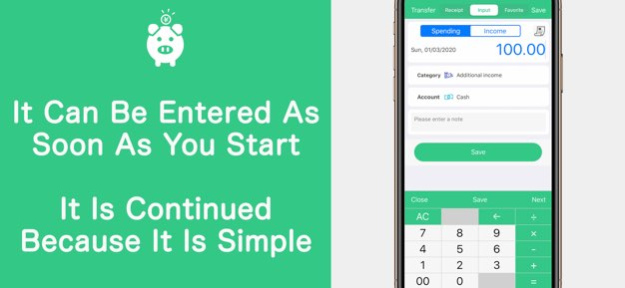


It is a household account book that can be easily input simple as can be continued.
There is also a receipt only registration can function so that it can be entered when a later love.
Fun and app recommended for those who want to accurately put a household account book.
--- Screen List ---
【calendar】
And registered them if two taps can be input
. Month of switchable on the left and right swipe
Watch in full-screen list is increasing
. Balance the day, it can be confirmed in a month
[Account balance]
- total assets can be seen immediately
. Balance of each account can be confirmed
. Transfer input support
【Graph】
. Budget breakdown in a pie chart is self-explanatory
Or descending order in the fee, possible rearrangement in ascending order
【receipt】
- the receipt in the wallet can be stored at photo
- After selecting a photo, can immediately input
---Setting items---
. Closing date can be set (calendar also be optimized)
Users of switching
And expenditure, income category, freely customize the account
And fixed monthly balance of payments can be entered
Backup data in iCloud
After considering if there is a request, such as I want to add an icon, it will respond at any time.
The new functions are also plans to add. looking forward to.
Please help us to save the daily gotten take advantage of MoneyKeep.
And restored at the time of the model change
At the time of change model, you can restore previously purchased paid version free of charge. Please have logged in to the iTunes of the iPhone . iPad terminal in the same AppleID the time of purchase (Settings => from the paid version in the app).
And confirmation and cancellation
Select the ""recommended"" at the bottom of the AppStore apps -> select the Apple ID -> select ""Show Apple ID"" -> select from the ""management"" that is in the subscription. Confirmation and the next automatic update timing from this screen, you can unlock / setting of automatic updates.
- Automatic continuation billing
Free trial is only valid for the first time. If you do not cancel before more than 24 hours of the trial period ends, two weeks after the free trial ends, it will be automatically charged.
If that is not the release of the automatic update before more than 24 hours of period end date, contract period will be automatically updated. Of automatic updating billing is done within 24 hours before the end of the contract period.
.important point
Those who are charged within the app can not be canceled in a way other than the above.
We do not accept cancellation of the current month.
It will be charged via the iTunes account.
.Terms of service
https://nilcraft.jp/privacy_policy_en
Version History Support for iOS 26.
A yearly Premium plan has been added. 1.9.8 May 14 Internal configuration has been modified. 1.9.7 12/31/2025 We have improved stability. 1.9.6 11/12/2025 We've added an automatic backup feature with Premium.
You can enable it from the settings screen.
We encourage you to consider upgrading to a Premium plan at this time. 1.9.5 11/10/2025 Fixed a bug that caused the days of the week in the calendar to shift.
iPhone settings now support the day of the week. Select your favorite day of the week in General, Language and Region, and Week Starts, and the calendar display will change. 1.9.4 04/10/2024 Corrections were made to the internal configuration. 1.9.3 01/11/2024 Corrections were made to the internal configuration. 1.9.2 06/07/2023 Fixed the display of graphs. 1.9.1 09/17/2022 Fixed a bug that caused crashes on iOS16 1.9.0 09/14/2022 Fixed a problem that caused numerical values to be displayed incorrectly in graphs. 1.8.8 04/11/2022 Fixed a crash when switching calendars. 1.8.7 04/05/2022 +Fixed a bug where the calendar screen would not refresh when entering data from the + button. 1.8.6 10/21/2021 Fixed a bug that caused ads to be displayed after purchasing premium features. 1.8.5 09/27/2021 Support for iOS15 has been added. 1.8.4 09/24/2021 Internal configuration has been fixed.
If you have any suggestions or requests, please use the settings screen of the application.
We will review and fix them as needed.
Thank you for your continued support of Money Keep. 1.8.3 07/20/2021 The graph can now be aggregated by year as well.
If you have any suggestions or requests, please use the settings screen of the application.
We will review and correct them as needed.
Thank you for your continued support of Money Keeper. 1.8.2 05/13/2021 The internal configuration has been modified.
If you have any suggestions or requests, please use the settings screen of the application.
We will review and fix them as needed.
Thank you for your continued support of Money Keeper. 1.8.1 02/12/2021 Fixed a bug that caused the app to crash after selecting the receipt image.
If you have any suggestions or requests, please use the app's settings screen.
We will review and fix it as needed.
Thank you for your continued support of Money Keeper. 1.8.0 01/26/2021 Bug and design fixes have been made.
If you have any comments or requests, please use the settings screen of the application.
We will review and fix them as needed.
Thank you for your continued support of Money Keeper. 1.7.9 01/23/2021 Dark mode can now be switched in the app.
Fixed a bug in the CSV output.
Design fixes.
If you have any suggestions or requests, please use the app's settings screen.
If you have any comments or requests, please send them to us via the settings screen of the application. We will review them and make corrections as needed.
Thank you for your continued support of MoneyKeep. 1.7.8 12/30/2020 Fixed a bug in date input.
If you have any comments or requests, please go to the app's settings screen.
We'll review and fix them as needed.
Thank you for your continued support of Money Keeper, the family bookkeeping app. 1.7.7 11/17/2020 Dark mode is now supported.
If you have any comments or requests, please go to the settings screen of the app.
We'll review and fix them as needed.
Thank you for your continued support of Money Keeper, the family bookkeeping app. 1.7.6 09/18/2020 Passcode lock is now available from the settings screen.
If you have any comments or requests, please go to the app settings screen.
We will review and revise it as needed.
Thank you for your continued support of Household Money Keepers. 1.7.5 06/17/2020 The following five functions added, made a correction.
- it can now be transferred from the input screen.
- Favorites can now be specified date in the input.
- Closing date has been added.
- The currency display can now be set.
- Multilingual
If you have any opinions and requests, thank you from the settings screen of the app.
Consider from time to time, we will fix.
Continue, thank you a household account book money keep. 1.7.4 03/04/2020 1.7.3 02/04/2020
About Spending Tracker MoneyKeep
The company that develops Spending Tracker MoneyKeep is NilCraft Inc.. The latest version released by its developer is 1.9.8.
To install Spending Tracker MoneyKeep on your iOS device, just click the green Continue To App button above to start the installation process. The app is listed on our website since 2026-10-06 and was downloaded 3 times. We have already checked if the download link is safe, however for your own protection we recommend that you scan the downloaded app with your antivirus. Your antivirus may detect the Spending Tracker MoneyKeep as malware if the download link is broken.
How to install Spending Tracker MoneyKeep on your iOS device:
- Click on the Continue To App button on our website. This will redirect you to the App Store.
- Once the Spending Tracker MoneyKeep is shown in the iTunes listing of your iOS device, you can start its download and installation. Tap on the GET button to the right of the app to start downloading it.
- If you are not logged-in the iOS appstore app, you'll be prompted for your your Apple ID and/or password.
- After Spending Tracker MoneyKeep is downloaded, you'll see an INSTALL button to the right. Tap on it to start the actual installation of the iOS app.
- Once installation is finished you can tap on the OPEN button to start it. Its icon will also be added to your device home screen.
Program Details
System requirements
Download information
Pricing
Version History
version 1.9.8
posted on 2026-10-06
Version History Support for iOS 26.
A yearly Premium plan has been added. 1.9.8 May 14 Internal configuration has been modified. 1.9.7 12/31/2025 We have improved stability. 1.9.6 11/12/2025 We've added an automatic backup feature with Premium.
You can enable it from the settings screen.
We encourage you to consider upgrading to a Premium plan at this time. 1.9.5 11/10/2025 Fixed a bug that caused the days of the week in the calendar to shift.
iPhone settings now support the day of the week. Select your favorite day of the week in General, Language and Region, and Week Starts, and the calendar display will change. 1.9.4 04/10/2024 Corrections were made to the internal configuration. 1.9.3 01/11/2024 Corrections were made to the internal configuration. 1.9.2 06/07/2023 Fixed the display of graphs. 1.9.1 09/17/2022 Fixed a bug that caused crashes on iOS16 1.9.0 09/14/2022 Fixed a problem that caused numerical values to be displayed incorrectly in graphs. 1.8.8 04/11/2022 Fixed a crash when switching calendars. 1.8.7 04/05/2022 +Fixed a bug where the calendar screen would not refresh when entering data from the + button. 1.8.6 10/21/2021 Fixed a bug that caused ads to be displayed after purchasing premium features. 1.8.5 09/27/2021 Support for iOS15 has been added. 1.8.4 09/24/2021 Internal configuration has been fixed.
If you have any suggestions or requests, please use the settings screen of the application.
We will review and fix them as needed.
Thank you for your continued support of Money Keep. 1.8.3 07/20/2021 The graph can now be aggregated by year as well.
If you have any suggestions or requests, please use the settings screen of the application.
We will review and correct them as needed.
Thank you for your continued support of Money Keeper. 1.8.2 05/13/2021 The internal configuration has been modified.
If you have any suggestions or requests, please use the settings screen of the application.
We will review and fix them as needed.
Thank you for your continued support of Money Keeper. 1.8.1 02/12/2021 Fixed a bug that caused the app to crash after selecting the receipt image.
If you have any suggestions or requests, please use the app's settings screen.
We will review and fix it as needed.
Thank you for your continued support of Money Keeper. 1.8.0 01/26/2021 Bug and design fixes have been made.
If you have any comments or requests, please use the settings screen of the application.
We will review and fix them as needed.
Thank you for your continued support of Money Keeper. 1.7.9 01/23/2021 Dark mode can now be switched in the app.
Fixed a bug in the CSV output.
Design fixes.
If you have any suggestions or requests, please use the app's settings screen.
If you have any comments or requests, please send them to us via the settings screen of the application. We will review them and make corrections as needed.
Thank you for your continued support of MoneyKeep. 1.7.8 12/30/2020 Fixed a bug in date input.
If you have any comments or requests, please go to the app's settings screen.
We'll review and fix them as needed.
Thank you for your continued support of Money Keeper, the family bookkeeping app. 1.7.7 11/17/2020 Dark mode is now supported.
If you have any comments or requests, please go to the settings screen of the app.
We'll review and fix them as needed.
Thank you for your continued support of Money Keeper, the family bookkeeping app. 1.7.6 09/18/2020 Passcode lock is now available from the settings screen.
If you have any comments or requests, please go to the app settings screen.
We will review and revise it as needed.
Thank you for your continued support of Household Money Keepers. 1.7.5 06/17/2020 The following five functions added, made a correction.
- it can now be transferred from the input screen.
- Favorites can now be specified date in the input.
- Closing date has been added.
- The currency display can now be set.
- Multilingual
If you have any opinions and requests, thank you from the settings screen of the app.
Consider from time to time, we will fix.
Continue, thank you a household account book money keep. 1.7.4 03/04/2020 1.7.3 02/04/2020
version 1.9.7
posted on 2025-12-31
Internal configuration has been modified.
version 1.9.4
posted on 2024-04-10
Apr 10, 2024
Version 1.9.4
Fixed a bug that caused the days of the week in the calendar to shift.
iPhone settings now support the day of the week. Select your favorite day of the week in General, Language and Region, and Week Starts, and the calendar display will change.
version 1.9.3
posted on 2024-01-11
Jan 11, 2024
Version 1.9.3
Corrections were made to the internal configuration.
version 1.9.2
posted on 2023-06-07
Jun 7, 2023
Version 1.9.2
Corrections were made to the internal configuration.
